
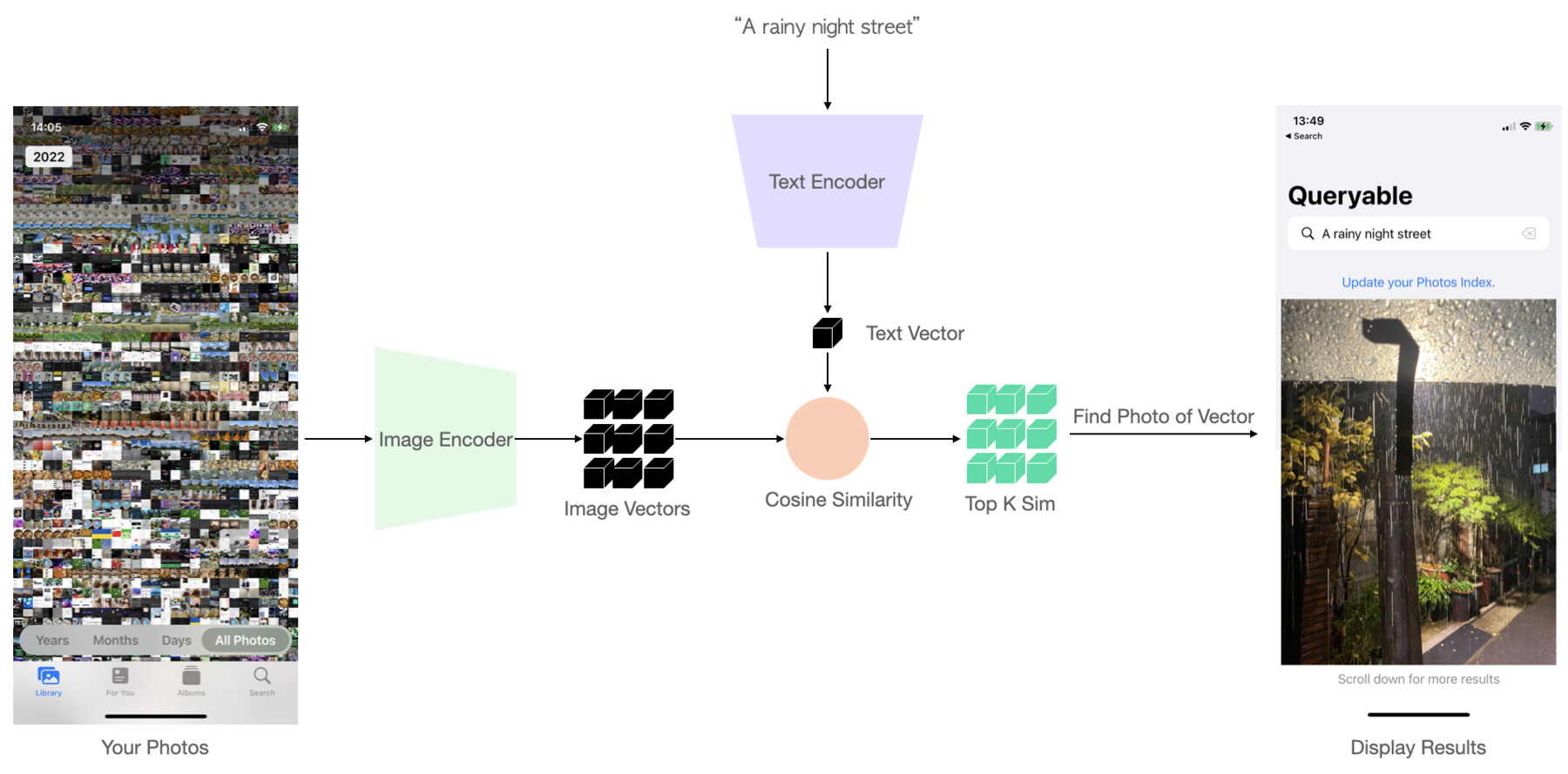
1. Build a local image index
After photo-library permission is granted, Queryable requests image data through Apple’s Photos framework. The image encoder turns each available item into a 512-dimensional numeric representation. That compact representation captures visual relationships; it is not a copy of the original image.
The current code processes photos in batches, detaches Core ML outputs from temporary image surfaces, and saves embeddings incrementally. Incremental storage lets the app append new work and compact its index instead of rewriting the whole library after every small change.
2. Encode words or a reference image
For a text search, the local text encoder maps the prompt into the same vector space used for images. Because the two encoders were trained to align visual and language meaning, “orange sunset over the sea” can land near photos with those visual characteristics.
For search by photo, the reference goes through the image encoder instead. The ranking stage is shared: compare one query vector with the library index and return the closest candidates.
3. Rank matches efficiently
Queryable normalizes saved embeddings and uses their dot product as a cosine-similarity ranking signal. Its current GPU search builds a contiguous Float16 matrix and performs a Metal-backed matrix multiplication against the query vector. That avoids a slow Swift loop over every photo for each search.
A time filter can restrict the allowed photo identifiers before results are published. The app keeps the most recent query embedding so changing filters does not necessarily require text to be encoded again.
Practical note: Similarity scores are relative ranking signals. They are not probabilities and should not be read as factual labels for a photo.
4. Understand the privacy boundary
The photo encoder, text encoder, saved embedding index and similarity search run on the device. Queryable does not need to submit a prompt and photo library to its own AI server. This also keeps repeat search responsive after the index exists.
The boundary includes Apple services the user has already chosen. With iCloud Photos and optimized storage, the user may first make an item local through Apple Photos; Queryable’s semantic index request itself keeps network access disabled. App Store purchases and system crash diagnostics are also governed by Apple’s platform settings and policies.
What changed after the original 2022 build
The first public implementation used OpenAI CLIP ViT-B/32, split into separate image and text encoders so photos could be indexed once. The current public project uses Apple MobileCLIP S2 by default. The model changed, but the central retrieval pattern in the diagram remains recognizable: precompute image vectors, encode each new query, then rank by vector similarity.
The original engineering note reported indexing roughly 2,000 photos per minute on an iPhone 12 mini and search times below one second for 10,000 photos and 2.8 seconds for 35,000. Those are dated measurements from the 2022 CLIP prototype—not performance promises for every current device, library or MobileCLIP release.
Practical note: Historical benchmarks are useful engineering evidence only when the model, device and date stay attached to them.
Common questions
Which model does Queryable use?
The open-source project uses Apple MobileCLIP-derived Core ML image and text encoders.
What is a photo embedding?
It is a compact numeric vector representing visual features in a space where related images and text can be compared. It is not the original photo.
Why does the first setup take time?
Every available library item must be requested, decoded and encoded before it can participate in local semantic search. Later changes can be added incrementally.
Primary sources and provenance
The details above are tied to the project’s original engineering record, public source or live distribution listing. Historical material is labeled separately from the current implementation.